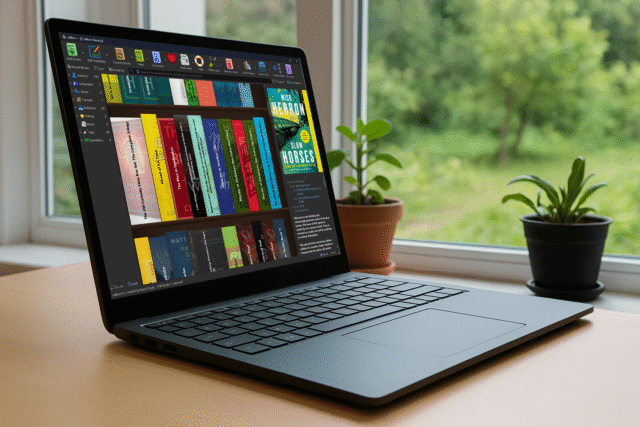
Calibre 9, the latest version of the popular ebook manager, has arrived. Changes include an improved interface, updates to the built-in reader and editor, platform-specific tweaks, and a wide range of fixes.
The free, open-source Calibre runs on Windows, macOS, and Linux and provides a single place to handle most ebook tasks, including library organization, format conversion, editing, reading, and device syncing.
SEE ALSO: Microsoft is killing off Word’s ‘Send to Kindle’ feature
Books are stored in virtual libraries where users can sort and search titles, edit author names, and change cover images. Metadata tools make it easy to keep large collections of books consistent, handy if they come from different stores and sources.
Calibre supports converting ebooks between many common formats so they work on a wide range of devices including Amazon Kindle and Kobo, and phones and tablets running Android or iOS.
Calibre 9
Calibre 9 arrives about a year after Calibre 8 and introduces several big changes, including a new Bookshelf view, which displays books arranged on shelves with visible spines. Users can switch to this view using the Layout button in the bottom-right corner of the main window.
The ebook viewer gains an Edit book button that appears when viewing editable formats such as epub, and AZW3. Selecting it opens the editor at roughly the same point in the book currently being read. Users can type a page number directly instead of scrolling through a list.
Platform-specific updates include momentum-based scrolling in the book list for Linux users, and Kobo device support has been updated to match newer firmware versions.
Users can adjust the font size of the AI chat widget or hide all AI-related features entirely in Calibre 9 through Preferences. Text output gains an option to replace images with their alt text, and epub handling improves support for certain non-standard files produced by some Japanese publishers.
Calibre 9 also includes a long list of bug fixes and performance improvements. These range from better handling of metadata to faster shutdown times and improved SVG export in the viewer. GPU acceleration for Qt WebEngine is disabled by default to reduce crashes on older systems, although it can be re-enabled.
A day after Calibre 9 arrived, Calibre 9.1 followed it with fixes for bugs that caused crashes when pasting cover images on macOS, database restore failures, problems with Read Aloud on Windows, and stretched covers on high DPI displays.
Calibre 9.1 is available to download from here.
What do you think about the latest version of the ebook manager? Let us know in the comments.