Aware of the strong feelings about AI – both positive and negative – Mozilla recently said that Firefox would become an AI browser, but promised that AI would be optional. Now the organization is making good on that promise.
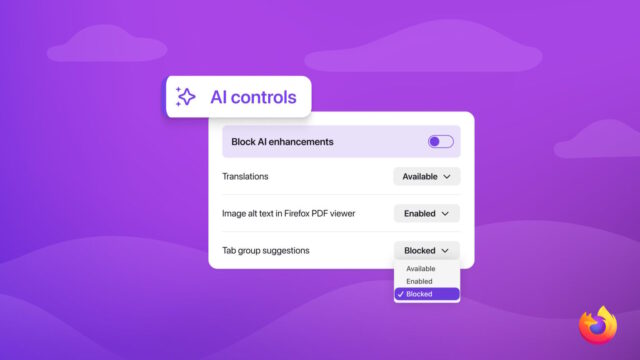
Starting with Firefox 148 – which is due for release later this month – Mozilla will feature the AI kill switch that users have been hoping for. But in addition to the option to disable everything in one feel swoop, there are also finer controls.
Firefox 148 will start to roll out on February 24, and this is when the new AI Controls section will make an appearance in the desktop version of the browser. While Mozilla sees the power of AI and is keen to embrace what it has to offer in order to enhance its web browser, it acknowledges that it is not to everyone’s taste.
Catering to fans of artificial intelligence, the organization lists the AI-powered features that are included with Firefox 148 at launch:
- Translations, which help you browse the web in your preferred language.
- Alt text in PDFs, which add accessibility descriptions to images in PDF pages.
- AI-enhanced tab grouping, which suggests related tabs and group names.
- Link previews, which show key points before you open a link.
- AI chatbot in the sidebar, which lets you use your chosen chatbot as you browse, including options like Anthropic Claude, ChatGPT, Microsoft Copilot, Google Gemini and Le Chat Mistral.
But Mozilla points out that some or all of these features can be toggled on and off:
You can choose to use some of these and not others. If you don’t want to use AI features from Firefox at all, you can turn on the Block AI enhancements toggle. When it’s toggled on, you won’t see pop-ups or reminders to use existing or upcoming AI features.
And it is the “Block AI enhancements” toggle which is the AI kill switch. Mozilla is treading a careful road between AI and non-AI, saying that the approach it has decided to take “lets you use Firefox without AI while we continue to build AI features for those who want them”.
Mozilla shares a video to preview what the new controls look like and to show off how they will work:
Staying ahead of any queries users may have about the “stickiness” of these settings, Mozilla offers the following assurances:
Once you set your AI preferences in Firefox, they stay in place across updates. You can also change them whenever you want.
The organization concludes by saying:
AI controls give you more say in how you move across the web.
We believe choice is more important than ever as AI becomes a part of people’s browsing experiences. What matters to us is giving people control, no matter how they feel about AI.
If you’d like to try AI controls early, they’ll be available first in Firefox Nightly.
How do you feel about this? Whether you are a fan of AI or not, does this approach feel like a good compromise?