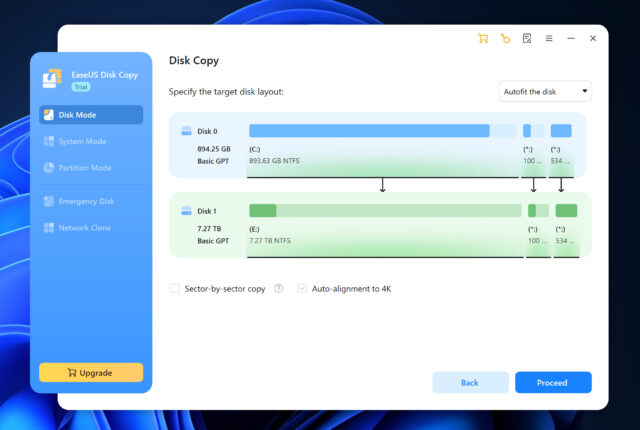
EaseUS has released a new version of its Windows disk management software that changes how cloning and backups are handled. EaseUS Disk Copy 7.0.0 introduces disk imaging alongside traditional cloning, allowing users to back up, restore, and migrate systems without relying on having multiple drives connected at the same time.
Instead of focusing only on copying data directly from one disk to another, support for disk imaging allows backups to be created and restored at different times.
SEE ALSO: Evernote 11 adds AI assistant, semantic search, and meeting notes
Previous versions of EaseUS Disk Copy were built around direct cloning tasks which included copying one disk to another or migrating data from an HDD to an SSD during hardware upgrades.
That approach worked well enough for straightforward replacements but required both the source and destination disks to be connected at once. This wasn’t much use for users considering upgrades in advance or managing systems remotely.
EaseUS Disk Copy 7.0.0 imaging
The new version adds the ability to create disk images from entire drives or selected partitions. These images can be stored, transferred, and restored later, without the need for immediate access to the target hardware.
Users will be able to prepare backups ahead of time and restore them when needed. The software also supports staged recovery plans and migrations across different locations.
The update also adds image-based restore for physical disks so users can restore full disks, migrate systems to new drives, or recover individual partitions while leaving unrelated data alone.
Virtual disk support has been improved as well. The software now works with common virtual disk formats such as VHD and VHDX, so systems stored in virtual environments can be restored to physical hardware.
This could be handy for cases where virtual machines are used for testing or development and later moved to physical systems and removes the need to reinstall operating systems or rebuild environments during that transition.
Instead of restoring an entire image, users can now choose specific partitions, helping reduce downtime and limiting unnecessary data overwrites.
System cloning now supports multiple installed operating systems. Users with dual-boot or multi-OS setups can clone systems that aren’t currently active, making it easier to reorganize storage or migrate specific operating systems without affecting others.
By combining disk imaging, image-based restore, virtual disk support, and selective system cloning, the software now supports a broader range of uses, including full system backup, remote migration using stored images, and restoring systems from external or network-based storage.
EaseUS Disk Copy 7.0.0 is available for Windows now, with upgrade options for existing users.
What do you think about this new version? Let us know in the comments.